Able to enter BIOS
Can speak English or translate
Have hands and patience
Need a USB drive
Introduction
This article is suitable for beginners who have no knowledge of Hackintosh. If you have already purchased a computer and want to install Hackintosh, you can continue reading.
If you are preparing to buy a device that can run Hackintosh, you can refer to laptops and desktops.
This article assumes you know how to use a VPN and GitHub.
Preliminary Search & Clarifying Configuration
The general boot principle of Hackintosh is: modify the config and DSDT to boot OS X.
Clarifying the configuration will significantly reduce the number of drivers you need to search for later. All you need to do is search for "model + EFI."
If you find relevant information, you can jump directly to the installation section.
If your computer is hard to find or too niche, and you still want to install Hackintosh, you will need to configure EFI yourself.
Configuring EFI
This is a big point!
Please combine information from multiple sources.
Do not rely solely on this article, and do not limit yourself to domestic internet resources.
Information You Need to Know
Hackintosh is not very picky about USB drives, but if it's too old, too niche, or AMD, it's better to save time and not consider it. Netbooks (Pentium, Celeron) should be directly passed.
Intel integrated graphics (HD + some numbers) and most AMD discrete graphics can generally be driven; please search for "graphics card model + Hackintosh."
There are very few network cards that can be driven, and those that can be driven often require special methods. Please search for specific situations; this article will not elaborate.
The same goes for sound cards; please search for them yourself.
Downloading Work
Must Download
The files here reference are essential software
Please remember their aliases (in parentheses).
Please keep all your downloaded files together, and install the software. Make sure you can find everything!
A plist editor for editing plist configurations: ProperTree or OpenCoreCFG.
Essential, download the release of Minimal EFI.
SSDT.
Disk utility (distinguishing tool) can be downloaded from Baidu.
Lilu.
WhateverGreen! Some AMD integrated graphics cannot be installed!.
Hackintosh Zone to download an image; you can message me for a copy.
Troubleshooting 1 Troubleshooting 2 These contain common issues encountered in Hackintosh; check here if you run into problems.
Total of 10 files
This is an additional section for laptops; desktop users can skip this.
Due to the presence of batteries, keyboards, and mice, most laptop users need to supplement these drivers. Of course, nothing is absolute; you cannot ensure that some will work without issues.
This section applies to most users. If this section does not work according to general tutorials, please search for the following content on Baidu:
All laptop users.
- SMCProcessor.kext
- SMCSuperIO.kext
- SMCLightSensor.kext
- SMCBatteryManager.kext
- SMCDellSensors.kext (for Dell users only)
Total of 4 (5 for Dell)
AMD Users need additional drivers
Graphics Card
Intel Integrated Graphics (meaning the computer has no discrete graphics)
Use this OC Toolbox for convenience.
Nvidia
Only supports up to 10.13.6
Reference This part is controversial, and the technology is relatively new. Additionally, I do not have an Nvidia graphics card to test.
So Nvidia users should test it themselves.
AMD Graphics (discrete graphics; if you have integrated graphics like Vega 8, you may need to wait or reverse engineer with C++).
AMD graphics are either plug-and-play or require spoofing the ID.
At this point, AMD users can shout: AMD YES.
If you are a Vega 8 user and happen to know C++ and have experience with reverse engineering, feel free to contact me.
Sound Card
For sound cards, different brands have different driver methods.
Some just require ID injection, some need additional drivers, and some cannot be driven at all.
I have found most sound card drivers available online; the rest you will need to test yourself. Sound Card.
Network Card
For Intel network cards, see Intel.
Search for your network card model here.
If you find your network card, search for "model + Hackintosh."
Now, all the downloading work should be done. You can take a short break; you've worked hard, but the real challenge is coming soon. Drink less, eat more.
Configuring EFI
Please follow this order or any order you won't mess up.
Please extract and install the downloaded files. If you see folders like XXX.kext, it means they are already minimal.
Please categorize the downloaded files.
Foundation
Extract the "Minimal EFI" to a location you can find.
Delete everything in the Tools folder.
Keep only OpenRuntime.efi in the Drivers folder. "Please understand this sentence carefully!"
Put this in the Drivers folder.
ACIP
The purpose of this step is to allow the system to control hardware, with software controlling hardware.
1 21. Open the **SSDT** folder and run **SSDTTime.bat** inside. 3 42. In the order of "4, 3, 2" (the order cannot be wrong), it will generate 3 files. 5 63. Now we need to process **SSDT-RTC0.dsl**. 7 8If it was not automatically generated, [download it](https://github.com/acidanthera/OpenCorePkg/tree/master/Docs/AcpiSamples/Source/SSDT-RTC0.dsl). 9 10Open it with a text editor and use all your knowledge to find: 11 12```plain text 13External (_SB_.PCI0.LPCB, DeviceObj) 14 15Scope (_SB.PCI0.LPCB) 16``` 17 18Modify it to: 19 20```plain text 21External (_SB_.PCI0.LPC, DeviceObj) 22 23Scope (_SB.PCI0.LPC) 24``` 25 264. Process **SSDT-PMC**. 27If it was not generated, [download it](https://github.com/acidanthera/OpenCorePkg/tree/master/Docs/AcpiSamples/Source/SSDT-PMC.dsl). 28 29```plain text 30External (_SB_.PCI0.LPCB, DeviceObj) 31 32Scope (_SB.PCI0.LPCB) 33``` 34 35Change it to: 36 37```plain text 38External (_SB_.PCI0.LPC, DeviceObj) 39 40Scope (_SB.PCI0.LPC) 41``` 42 435. Compile. 44Use this command: 45 46```plain text 47acpihelp.exe -o filename 48``` 49 50**Replace "filename" with the names of the 5 files you just generated.** 51Finally, ensure you can see 5 files ending with XXX.aml. 52 536. Now, create a new folder, place the files inside, and name it "ACPI" to replace it in the "Minimal EFI" folder. 54 55### *Configuring OpenCoreCFG* 56 57[Please refer to this](https://post.smzdm.com/p/aqm8nxvx/); the author has written this part well, please check it out. 58 59I will consider writing my own in the future. 60 61### *Assembly* 62 63Place the **kexts folder** and **ACPI** in the "Minimal EFI." 64 65At this point, your "Minimal EFI" should have images 1.1 and 1.2. 66 67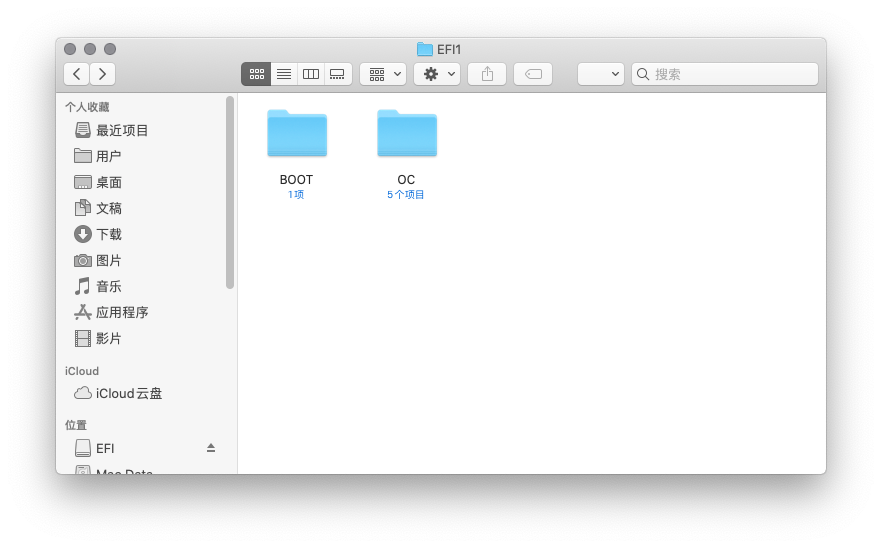 68 69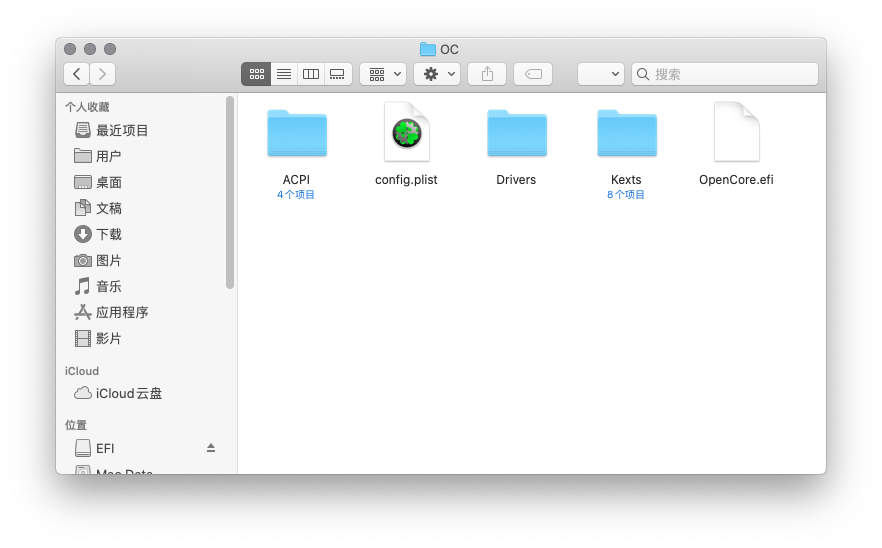 70 71Rename your "Minimal EFI" to EFI. 72 73```plain text 74Take a break; you've made it this far. 75 76Well done! 77 78After this step, the official installation will begin. 79``` 80 81## **Start Installation** 82 83### 1. Write Disk 84 85Use the "disk writing tool" to write the downloaded image to the USB drive. 86 87~~If you get stuck at "Validating," just skip it.~~ 88 89For beginners: When you see both a green progress bar and the word "Skip," just click **skip**. 90 91### 2. Enter BIOS 92 93*Using all your knowledge, enter BIOS and disable (ignore what you don't have).* 94 95```plain text 96Fast Boot 97Secure Boot 98Serial/COM Port 99Parallel Port 100VT-d 101CSM 102Thunderbolt (some may not have drivers) 103Intel SGX 104Intel Platform Trust 105CFG Lock (if possible) 106``` 107 108*Enable* 109 110```plain text 111VT-x 112Above 4G decoding 113Hyper-Threading 114Execute Disable Bit 115EHCI/XHCI Hand-off 116OS type: other 117UEFI Mode 118DVMT Pre-Allocated: 64MB 119SATA Mode: AHCI 120``` 121 122### 3. Boot Up 123 124Boot from your USB drive. 125 126### 4. Installation 127 128First, set the installation program to a language you are familiar with; it’s best not to log in with an Apple ID. 129 130If you find that the image you downloaded is in Russian and cannot find where to change it, please use translation software, I recommend *Google Translate*. 131 132Second, if you are installing a system prior to Catalina (10.15.x), please [refer to this](https://www.applex.net/threads/macos-mojave.93508/). 133 134### Aftermath 135 136Now, if all goes well, you should be in the system. 137 138Some network cards and sound cards may require additional operations; please follow the corresponding tutorials. 139 140The injection part for the three codes is covered in the earlier *OpenCoreCFG* configuration section. 141 142Another author has already mentioned it, so I won’t elaborate further. 143 144## Conclusion 145 146The article was written in a hurry, and I am not very familiar with some things. I hope everyone has the patience to work through it slowly. 147 148Since Apple released the M1 chip, it’s uncertain how long Hackintosh will last. Let’s cherish it while we can. 149 150If you are a Vega 8 user and happen to know C++ to write drivers, I can help you find progress abroad. 151 152Thanks to all the developers who have silently contributed to Hackintosh! 153 154Best regards, 155 156—————————————————————————— 157 158Please indicate the source if you reprint this; derivative works are allowed. 159 160If you encounter problems during installation, you can contact me on Telegram: [Charles](https://www.notion.so/rivertwilight/t.me/Mistry_Rain). 161 162All operations are sourced from the internet; please take responsibility for any issues you encounter! 163 164The article has been authorized for publication by [Gloridust](https://gloridust.xyz/) and [Rene](https://rene.wang/). 165